
Table of Contents
- Introduction
- What is Programming?
- Why Learn Programming?
- How Programming Works
- Types of Programming Languages
- Popular Programming Languages
- Programming Roadmap
- Best Practices
- Career Opportunities
- Frequently Asked Questions
- Conclusion
Introduction
Technology is shaping every part of modern life. From smartphones and websites to artificial intelligence and self-driving cars, programming is the foundation behind these innovations.
Many people want to learn programming but don’t know where to begin. With hundreds of programming languages, countless tutorials, and endless advice online, getting started can feel overwhelming.
The good news is that learning programming is easier than ever. With the right roadmap and consistent practice, anyone can build valuable coding skills.
In this complete guide, you’ll learn what programming is, why it’s important, the most popular programming languages, how to start your journey, and the career opportunities available in today’s digital world.
What is Programming?
Programming is the process of creating a set of instructions that tells a computer what to do. These instructions are written in programming languages that computers can interpret and execute.
Simply put, programming allows humans to communicate with computers.
Every application you use—including social media platforms, banking apps, video games, and business software—exists because programmers wrote the code behind them.
Real-Life Examples
- Online shopping websites
- Mobile banking applications
- GPS navigation systems
- Video games
- AI chatbots
- Healthcare software
Why is Programming Important?
Programming powers nearly every digital service we use.
Benefits
- Creates websites and applications
- Automates repetitive tasks
- Solves real-world problems
- Drives innovation
- Opens high-paying career opportunities
- Helps businesses improve productivity
- Supports AI, robotics, cybersecurity, and cloud computing
According to industry reports, software development remains one of the fastest-growing professions worldwide, with demand continuing to rise across healthcare, finance, education, manufacturing, and technology.
How Does Programming Work?
The programming process generally follows these steps:
- Identify the problem.
- Design a solution or algorithm.
- Write the code.
- Test the program.
- Fix bugs.
- Improve performance.
- Deploy the software.
- Maintain and update it over time.
Programming is an iterative process. Developers continuously refine and improve their applications based on user feedback and changing requirements.
Types of Programming Languages
Different programming languages are designed for different purposes.
| Type | Common Uses | Popular Languages |
|---|---|---|
| Web Development | Websites | HTML, CSS, JavaScript |
| Backend Development | Servers & APIs | Python, Java, PHP, Node.js |
| Mobile Development | Android & iOS Apps | Kotlin, Swift |
| Desktop Applications | Windows & macOS Software | C#, Java |
| Game Development | Video Games | C++, C# |
| Data Science | Analytics & Machine Learning | Python, R |
| Artificial Intelligence | AI Applications | Python |
| Systems Programming | Operating Systems | C, C++ |
Popular Programming Languages
Python
Python is one of the easiest programming languages for beginners. It is widely used in web development, data science, artificial intelligence, automation, and cybersecurity.
Advantages
- Easy syntax
- Large community
- Extensive libraries
- Excellent for beginners
JavaScript
JavaScript is essential for building interactive websites. It runs in web browsers and is also used on servers through Node.js.
Advantages
- High demand
- Versatile
- Large ecosystem
- Great for full-stack development
Java
Java is widely used in enterprise software, Android development, and financial systems.
Advantages
- Platform independent
- Highly secure
- Strong performance
- Excellent job opportunities
C++
C++ provides high performance and is commonly used for game development, embedded systems, and operating systems.
Advantages
- Fast execution
- Powerful memory control
- Used in performance-critical applications
Programming Learning Roadmap
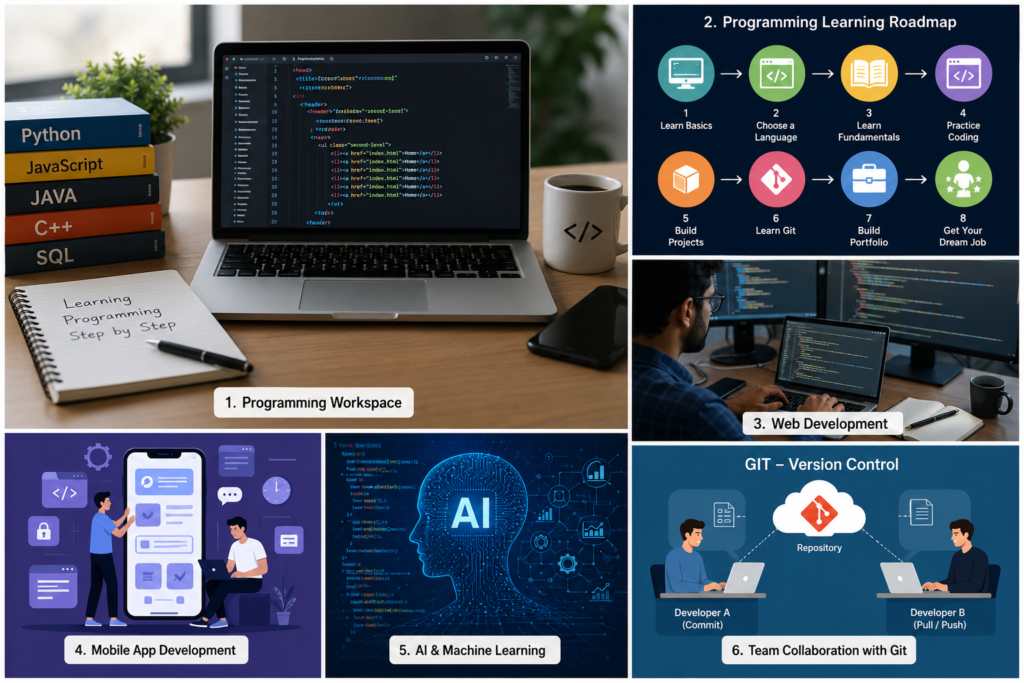
Learning programming becomes much easier when you follow a structured roadmap instead of jumping between random tutorials.
Step 1: Understand Computer Basics
Before writing code, learn how computers work.
Topics to cover:
- Computer hardware
- Operating systems
- Files and folders
- Internet basics
- Memory (RAM)
- CPU
Step 2: Choose Your First Programming Language
If you’re a beginner, start with Python because it has simple syntax and is widely used.
Other good options include:
| Goal | Recommended Language |
|---|---|
| Web Development | JavaScript |
| Artificial Intelligence | Python |
| Android Apps | Kotlin |
| iOS Apps | Swift |
| Desktop Software | C# |
| Game Development | C++ |
| Data Science | Python |
| Enterprise Software | Java |
Tip: Focus on one language first. Mastering the basics is more valuable than learning many languages at once.
Step 3: Learn Programming Fundamentals
Build a strong foundation by understanding:
- Variables
- Data Types
- Operators
- Input and Output
- Conditional Statements (if/else)
- Loops (for, while)
- Functions
- Arrays and Lists
- Strings
- Dictionaries or Objects
- Error Handling
These concepts appear in almost every programming language.
Step 4: Practice Daily
Programming is a practical skill. Reading alone isn’t enough.
Spend at least 30–60 minutes each day writing code.
Ideas for practice:
- Build a calculator
- Create a number guessing game
- Make a to-do list app
- Design a simple website
- Write automation scripts
Step 5: Learn Data Structures and Algorithms
Understanding algorithms improves problem-solving skills and prepares you for technical interviews.
Key topics include:
- Arrays
- Linked Lists
- Stacks
- Queues
- Trees
- Graphs
- Hash Tables
- Sorting Algorithms
- Searching Algorithms
Step 6: Learn Version Control
Professional developers use Git to track code changes and collaborate with teams.
Learn how to:
- Create repositories
- Commit changes
- Create branches
- Merge code
- Resolve conflicts
Hosting your projects online also helps build a strong portfolio.
Step 7: Build Real Projects
Projects demonstrate your skills better than certificates.
Beginner Projects:
- Calculator
- Weather App
- Quiz App
- Expense Tracker
- Notes Application
Intermediate Projects:
- E-commerce Website
- Chat Application
- Blog System
- Inventory Management
- School Management System
Advanced Projects:
- AI Chatbot
- Face Recognition System
- Video Streaming Platform
- Online Learning Platform
- Cloud-Based Applications
Programming Best Practices
Good programmers write code that is easy to understand and maintain.
Follow Clean Code Principles
- Use meaningful variable names.
- Keep functions short.
- Write readable code.
- Remove unnecessary code.
- Avoid duplication.
Example
Instead of:
x = 25Write:
student_age = 25The second example is much easier to understand.
Write Comments Carefully
Comments should explain why something is done, not simply repeat what the code already says.
Test Your Programs
Always verify that your code works correctly.
Testing helps:
- Find bugs early
- Improve reliability
- Prevent future issues
Keep Learning
Technology changes quickly.
Stay updated by:
- Reading documentation
- Building new projects
- Following developer blogs
- Joining coding communities
Common Mistakes Beginners Make
Avoid these common pitfalls:
- Trying to learn too many languages at once
- Memorizing code instead of understanding concepts
- Not practicing consistently
- Ignoring debugging skills
- Copying code without learning how it works
- Giving up after encountering errors
Remember: every programmer encounters bugs. Solving them is part of the learning process.
Career Opportunities in Programming
Codding skills open doors to many industries.
| Career | Primary Responsibilities |
| Software Developer | Build desktop and enterprise applications |
| Web Developer | Create websites and web applications |
| Mobile App Developer | Develop Android and iOS apps |
| Data Scientist | Analyze data and build predictive models |
| AI Engineer | Create intelligent systems using machine learning |
| Cybersecurity Analyst | Protect systems and networks |
| Game Developer | Design and develop video games |
| Cloud Engineer | Manage cloud infrastructure and services |
| DevOps Engineer | Automate software deployment and operations |
Many of these roles offer competitive salaries and opportunities to work remotely with companies around the world.
Real-World Applications of Programming
IT powers countless technologies we use every day:
- Online banking
- Social media platforms
- Search engines
- E-commerce websites
- Ride-sharing apps
- Streaming services
- Healthcare systems
- Educational platforms
- Smart home devices
- Artificial intelligence assistants
No matter the industry, Coding helps solve real-world problems and improve efficiency.
Expert Tips for Learning Coding Faster
- Practice every day, even if only for 30 minutes.
- Focus on understanding concepts rather than memorizing syntax.
- Build projects that solve real problems.
- Read other developers’ code to learn new techniques.
- Break large problems into smaller, manageable tasks.
- Learn debugging—it is one of the most valuable programming skills.
- Be patient. Consistency leads to long-term success.
Internal Linking Suggestions
Use these links naturally throughout the article:
- https://aiteachy.com/ – Home Page
- https://aiteachy.com/blog/ – Tutorials
- https://aiteachy.com/python-guide/ – Python Guide
- https://aiteachy.com/web-development/ – Web Development
- https://aiteachy.com/artificial-intelligence/ – Artificial Intelligence
(Ensure these URLs exist or update them to match your site’s structure.)
External Authority Sources
Link to reputable resources such as:
- https://developer.mozilla.org/
- https://docs.python.org/
- https://learn.microsoft.com/
- https://www.oracle.com/java/
- https://opensource.google/
Frequently Asked Questions (FAQs)
1. What is computer programming?
Computer programming is the process of writing instructions (called code) that tell a computer how to perform specific tasks. These instructions are written using programming languages such as Python, Java, C++, and JavaScript.
2. Which programming language is best for beginners?
Python is widely considered the best choice because it has simple syntax, a large community, and can be used for web development, automation, artificial intelligence, and data science.
3. How long does it take to learn programming?
The time required depends on your goals and consistency.
- Basic programming: 2–3 months
- Intermediate level: 6–12 months
- Professional level: 1–2 years of regular practice and project building
4. Do I need a computer science degree?
No. Many successful developers are self-taught or have completed online courses and built strong portfolios. Practical skills and real-world projects often matter more than formal qualifications.
5. Can I learn Coding for free?
Yes. Many high-quality resources are available online, including documentation, tutorials, coding challenges, and open-source projects.
6. Is programming difficult?
Programming can be challenging at first, but with consistent practice and problem-solving, it becomes much easier over time.
7. Which programming language has the highest demand?
Some of the most in-demand coding languages include:
- Python
- JavaScript
- Java
- C#
- TypeScript
- Go
Demand varies by industry and location.
8. Can programming help me get a remote job?
Yes. Programming is one of the best skills for remote work. Many companies hire developers worldwide for web development, mobile apps, AI, cloud computing, cybersecurity, and software engineering.
9. What projects should beginners build?
Start with small projects such as:
- Calculator
- To-Do List App
- Quiz Application
- Weather App
- Personal Portfolio Website
- Expense Tracker
- Notes Application
These projects help reinforce Coding concepts and build your portfolio.
10. What is the best way to improve coding skills?
The best way to improve is through regular practice. Build projects, solve coding problems, read documentation, and review your own code to identify areas for improvement.